
Kubernetes cluster management repository guide part 1
Introduction
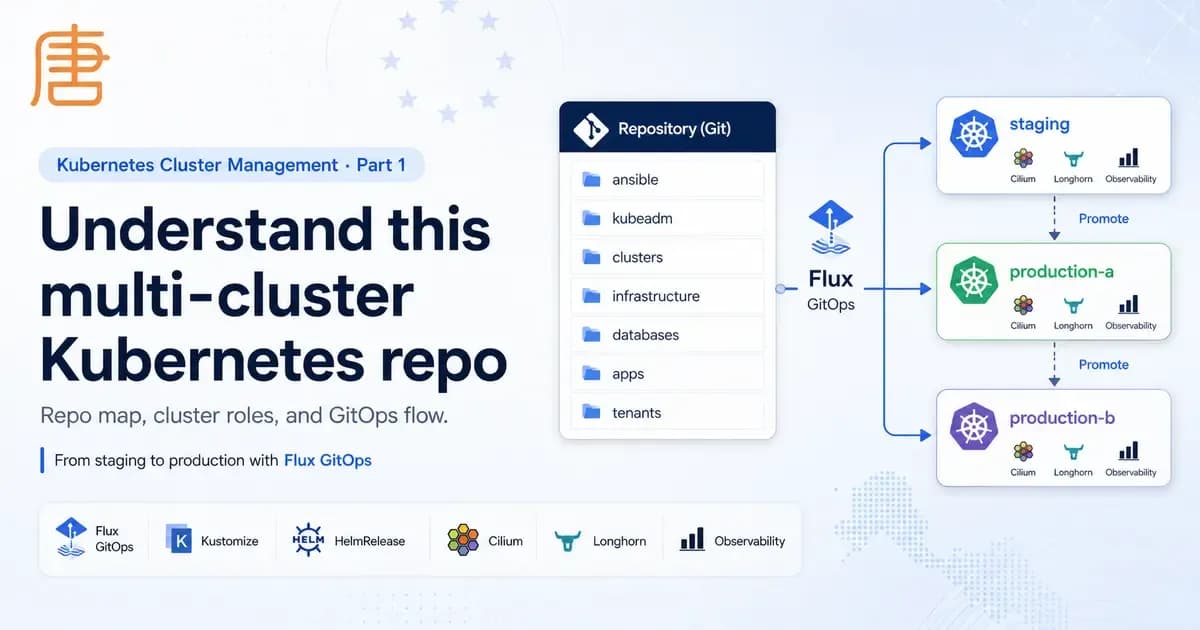
This series shows how to build Kubernetes cluster management from bare machines to production operations. The pattern manages several Kubernetes clusters with Ansible, kubeadm, Cilium, Flux, Kustomize, HelmRelease resources, Sealed Secrets, Longhorn, observability, databases, applications, and tenant GitOps.
The important habit is simple: create a staging cluster, prove changes there first, then promote the same pattern to production clusters. In the examples below, staging is the cluster used to test new infrastructure versions, such as a Longhorn upgrade, before changing production-a or production-b.
This first part explains the repo map and operating model. Later parts cover bootstrap, configuration, secrets, apps, daily maintenance, and upgrades.
Cluster roles
Create one cluster path per environment. A good starting point is:
clusters/stagingfor platform tests, Helm chart upgrades, Longhorn version checks, Cilium changes, cert-manager changes, and GitOps workflow validation.clusters/production-afor the first production cluster. It can include infrastructure, databases, apps, and tenants.clusters/production-bfor another production cluster. It can run the same platform with different apps, tenants, regions, or capacity.
The inventories match those cluster roles:
ansible/staging-inventory.ini
ansible/production-a-inventory.ini
ansible/production-b-inventory.ini
The staging cluster can be smaller, but it should be realistic enough to test storage, networking, certificates, observability, and upgrades. Production clusters should use the node count and failure-domain layout required by your workloads.
Repository map
The root directories are the main operating surface:
ansible/         Node setup, reset, kubeadm init, Kubernetes upgrades
kubeadm/         kubeadm and Cilium bootstrap templates
clusters/        Flux entrypoints for each cluster
infrastructure/  Shared and cluster-specific platform components
databases/       Galera MariaDB and CloudNativePG resources
apps/            Shared app bases and cluster overlays
tenants/         Tenant namespaces, Git sources, artifacts, RBAC
credentials/     Local ignored credentials workspace
playground/      Local ignored test workspace
The active control loop starts in clusters/<name>. Flux bootstraps that directory, then the cluster reconciles the rest of the repo from there.
Build the scaffold
If you are starting from scratch, create the same top-level layout first:
mkdir -p ansible kubeadm clusters infrastructure databases apps tenants credentials playground
mkdir -p clusters/staging clusters/production-a clusters/production-b
mkdir -p infrastructure/phase0/{base,staging,production-a,production-b}
mkdir -p infrastructure/phase1/{base,staging,production-a,production-b}
mkdir -p infrastructure/phase2/{base,staging,production-a,production-b}
mkdir -p infrastructure/phase3/{base,staging,production-a,production-b}
mkdir -p apps/base apps/staging apps/production-a apps/production-b
mkdir -p databases/base databases/staging databases/production-a databases/production-b
mkdir -p tenants/staging tenants/production-a tenants/production-b
Then add one inventory per cluster:
ansible/staging-inventory.ini
ansible/production-a-inventory.ini
ansible/production-b-inventory.ini
The rest of the guide fills these directories with bootstrap playbooks, Flux entrypoints, infrastructure phases, workload overlays, and tenant definitions.
The GitOps chain
Each cluster has Flux manifests under clusters/<name>. For example, clusters/staging/flux-system/gotk-sync.yaml points Flux at:
./clusters/staging
The cluster path then applies these resources:
clusters/staging/artifacts.yaml
clusters/staging/infrastructure.yaml
clusters/staging/databases.yaml
clusters/staging/apps.yaml
artifacts.yaml uses ArtifactGenerator to split the monorepo into smaller artifacts:
infrastructure  from infrastructure/**
apps            from apps/base/** and apps/staging/**
databases       from databases/base/** and databases/staging/**
tenants         from tenants/** when enabled by the cluster
The cluster Kustomizations consume those generated artifacts. This keeps the management flow cleaner because Flux does not need every cluster to apply every directory directly.
Create this starter clusters/staging/artifacts.yaml:
---
apiVersion: source.extensions.fluxcd.io/v1beta1
kind: ArtifactGenerator
metadata:
  name: flux-system
  namespace: flux-system
spec:
  sources:
    - alias: monorepo
      kind: GitRepository
      name: flux-system
  artifacts:
    - name: infrastructure
      originRevision: "@monorepo"
      copy:
        - from: "@monorepo/infrastructure/**"
          to: "@artifact/"
    - name: apps
      originRevision: "@monorepo"
      copy:
        - from: "@monorepo/apps/base/**"
          to: "@artifact/base/"
        - from: "@monorepo/apps/staging/**"
          to: "@artifact/staging/"
    - name: databases
      originRevision: "@monorepo"
      copy:
        - from: "@monorepo/databases/base/**"
          to: "@artifact/base/"
        - from: "@monorepo/databases/staging/**"
          to: "@artifact/staging/"
    - name: tenants
      originRevision: "@monorepo"
      copy:
        - from: "@monorepo/tenants/staging/**"
          to: "@artifact/staging/"
Create this starter clusters/staging/infrastructure.yaml:
---
apiVersion: kustomize.toolkit.fluxcd.io/v1
kind: Kustomization
metadata:
  name: infra-phase0
  namespace: flux-system
spec:
  interval: 1h
  retryInterval: 1m
  timeout: 20m
  sourceRef:
    kind: ExternalArtifact
    name: infrastructure
  path: ./phase0/staging
  prune: true
  wait: true
---
apiVersion: kustomize.toolkit.fluxcd.io/v1
kind: Kustomization
metadata:
  name: infra-phase1
  namespace: flux-system
spec:
  dependsOn:
    - name: infra-phase0
  interval: 1h
  retryInterval: 1m
  timeout: 20m
  sourceRef:
    kind: ExternalArtifact
    name: infrastructure
  path: ./phase1/staging
  prune: true
  wait: true
---
apiVersion: kustomize.toolkit.fluxcd.io/v1
kind: Kustomization
metadata:
  name: infra-phase2
  namespace: flux-system
spec:
  dependsOn:
    - name: infra-phase1
  interval: 1h
  retryInterval: 1m
  timeout: 20m
  sourceRef:
    kind: ExternalArtifact
    name: infrastructure
  path: ./phase2/staging
  prune: true
  wait: true
---
apiVersion: kustomize.toolkit.fluxcd.io/v1
kind: Kustomization
metadata:
  name: infra-phase3
  namespace: flux-system
spec:
  dependsOn:
    - name: infra-phase2
  interval: 1h
  retryInterval: 1m
  timeout: 20m
  sourceRef:
    kind: ExternalArtifact
    name: infrastructure
  path: ./phase3/staging
  prune: true
  wait: true
Create this starter clusters/staging/databases.yaml:
---
apiVersion: kustomize.toolkit.fluxcd.io/v1
kind: Kustomization
metadata:
  name: databases
  namespace: flux-system
spec:
  dependsOn:
    - name: infra-phase3
  interval: 1h
  retryInterval: 2m
  timeout: 10m
  sourceRef:
    kind: ExternalArtifact
    name: databases
  path: ./staging
  prune: true
  wait: true
Create this starter clusters/staging/apps.yaml:
---
apiVersion: kustomize.toolkit.fluxcd.io/v1
kind: Kustomization
metadata:
  name: apps
  namespace: flux-system
spec:
  dependsOn:
    - name: databases
  interval: 1h
  retryInterval: 2m
  timeout: 10m
  sourceRef:
    kind: ExternalArtifact
    name: apps
  path: ./staging
  prune: true
  wait: true
Create this starter clusters/staging/tenants.yaml if the cluster will host tenants:
---
apiVersion: kustomize.toolkit.fluxcd.io/v1
kind: Kustomization
metadata:
  name: tenants
  namespace: flux-system
spec:
  dependsOn:
    - name: apps
  interval: 1h
  retryInterval: 2m
  timeout: 10m
  sourceRef:
    kind: ExternalArtifact
    name: tenants
  path: ./staging
  prune: true
  wait: true
Reconciliation order
The infrastructure phases are ordered by dependencies:
infra-phase0
infra-phase1 depends on infra-phase0
infra-phase2 depends on infra-phase1
infra-phase3 depends on infra-phase2
databases    depends on infra-phase3
apps         depends on databases
tenants      depends on apps or infra-phase3, depending on cluster
This order matters. For example, cert-manager cannot issue certificates until phase 2 and phase 3 are ready. Databases should wait until storage, operators, monitoring, and issuers exist. Apps should wait until databases exist.
Infrastructure phases
Phase 0 is the foundation:
Longhorn
Cilium
kubelet-csr-approver
Sealed Secrets
Reloader
Phase 1 adds GitOps notifications, private access, tunnels, and observability:
Flux notifications
Cloudflare tunnel
Longhorn recurring jobs
Tailscale operator
Loki
Alloy
kube-prometheus-stack
Grafana
Alertmanager
Phase 2 adds operators, dashboards, alerts, and node maintenance:
cert-manager
trust-manager
mariadb-operator
CloudNativePG
metrics-server
kured
Falco
Longhorn and cert-manager dashboards
Prometheus rules
ServiceMonitors
Phase 3 adds cluster ingress and certificate issuers:
Gateway namespace
letsencrypt ClusterIssuer
zerossl ClusterIssuer
Cilium operator restart job
cluster-specific Gateways
Base and overlay pattern
Most platform components live in a base directory and are patched per cluster:
infrastructure/phase0/base
infrastructure/phase0/staging
infrastructure/phase0/production-a
infrastructure/phase0/production-b
The same pattern is used for later phases, databases, and apps. A production default usually lives in base, while a cluster overlay changes only what is different.
Use this promotion model:
- Change the
stagingoverlay when the change is cluster-specific. - Change the base only when the new version or setting is ready for all clusters.
- Add production overlays only when a production cluster needs different values.
Staging workflow
Use staging as the first place to test platform upgrades. For example, keep a production Longhorn version in the base:
version: '~1.11.0'
The comment notes that production should stay stable and new versions should be tested in staging. A safe staging flow is:
- Patch the component version in the
stagingoverlay when possible. - Commit and push the staging change.
- Reconcile
staging. - Verify pods, CRDs, data, alerts, dashboards, storage, and applications.
- Leave it running long enough to catch regressions.
- Promote the version to
baseor to production overlays.
This keeps production changes predictable because the staging cluster exercises the same GitOps chain as production.
Naming conventions
Use these conventions when adding resources:
- Cluster entrypoints go under
clusters/<cluster>. - Shared infrastructure goes under
infrastructure/<phase>/base. - Cluster infrastructure patches go under
infrastructure/<phase>/<cluster>. - Shared app manifests go under
apps/base/<app>. - Cluster app overlays go under
apps/<cluster>/<app>. - Shared database manifests go under
databases/base/<engine>. - Cluster database overlays go under
databases/<cluster>/<engine>. - Tenant manifests go under
tenants/<cluster>/<tenant>.
Prerequisites
Before using this pattern end to end, prepare:
- Ubuntu nodes with SSH access as
ubuntu. - DNS name for the Kubernetes API endpoint, such as
k8s.example.com. - SSH deploy key for Flux to read your GitOps repository.
- GPG keyring for Flux commit signing.
kubectl,helm,flux,kubeseal, andcloudflared.- Sealed Secrets private key backup if rebuilding an existing cluster.
- Cloudflare API token for DNS-01 certificates.
- ZeroSSL EAB credentials if using the ZeroSSL issuer.
- Slack webhook URLs for Flux, Alertmanager, kured, and Falco.
- Tailscale OAuth credentials for the Tailscale operator.
Day-zero checklist
Use this checklist before bootstrapping a new cluster:
- Pick the cluster name, such as
staging,production-a, orproduction-b. - Confirm the inventory file has the correct init controller, join controllers, workers, and
ansible_user. - Confirm the API endpoint DNS resolves to the load-balanced or selected control-plane endpoint.
- Copy and edit
kubeadm/init-config.yamlfor the cluster. - Copy and edit
kubeadm/cilium.yamlfor the cluster. - Prepare encryption config on control-plane nodes.
- Prepare Sealed Secrets key restore if this is an existing cluster.
- Prepare phase secrets before Flux reaches each phase.
- Bootstrap Flux to
clusters/<cluster>.
Useful commands
Check Flux status:
flux get kustomizations -A
flux get helmreleases -A
flux get sources all -A
Force a reconciliation:
flux reconcile source git flux-system -n flux-system
flux reconcile kustomization flux-system -n flux-system --with-source
Suspend or resume the root sync:
flux suspend kustomization flux-system -n flux-system
flux resume kustomization flux-system -n flux-system
Check cluster health:
kubectl get nodes -o wide
kubectl get pods -A
kubectl get events -A --sort-by=.lastTimestamp
What comes next
Part 2 bootstraps the nodes with Ansible, kubeadm, Cilium, and Flux. That is where the repository design moves into a running control plane.
References
- Part 1 - Overview
- Part 2 - Bootstrap Kubernetes clusters
If you found this useful, you can buy me a coffee! Thanks for the support!