
How to Setup k8s Gateway API with Istio
Introduction
Gateway API is an official Kubernetes project dedicated to Layer 4 and Layer 7 routing within Kubernetes environments. Istio's support for the Gateway API is now generally available with the release of version 1.22. You will learn how to configure and install the Kubernetes Gateway API with Istio by following this guide.
Prerequisites
- A Kubernetes cluster v1.27+.
- Helm v3.
Step-by-step Guide
-
Create the
gatewaynamespace and install the Gateway API CRDs:bashkubectl create ns gateway kubectl apply -f https://github.com/kubernetes-sigs/gateway-api/releases/download/v1.1.0/standard-install.yaml -
Create the
istio-systemand configure the Helm repository:bashkubectl create ns istio-system helm repo add istio https://istio-release.storage.googleapis.com/charts -
Install the Istio base chart, which is required before the Istio control plane can be deployed. It contains the cluster-wide Custom Resource Definitions (CRDs):
bashhelm install istio-base istio/base -n istio-system --set defaultRevision=default -
Install the Istio discovery chart to start the istiod service:
bashhelm install istiod istio/istiod -n istio-system --wait -
Verify that the
istiodservice has been installed correctly:bashkubectl get pods -n istio-system NAME READY STATUS RESTARTS AGE istiod-d56968787-mf8tv 1/1 Running 0 2m49s -
Verify that the Istio's gateway class is also deployed:
bashkubectl get gatewayclass -n gateway NAME CONTROLLER ACCEPTED AGE istio istio.io/gateway-controller True 6m10s
Deploy the Istio's book sample application
-
Create the
booknamespace and enable Istio:bashkubectl create ns book kubectl label namespace book istio-injection=enabled -
Apply the sample book application
bashkubectl -n book apply -f https://raw.githubusercontent.com/istio/istio/release-1.22/samples/bookinfo/platform/kube/bookinfo.yaml -
Deploy the Kubernetes Gateway for the application:
bashkubectl -n book apply -f https://raw.githubusercontent.com/istio/istio/release-1.22/samples/bookinfo/gateway-api/bookinfo-gateway.yaml -
Verify that the gateway is programmed:
bashkubectl get gateway -n book NAME CLASS ADDRESS PROGRAMMED AGE bookinfo-gateway istio bookinfo-gateway-istio.book.svc.cluster.local True 43s -
If the gateway is not programmed, usually not using cloud load balancer, try to use the NodePort instead:
bashkubectl -n book annotate gateway bookinfo-gateway networking.istio.io/service-type=NodePort
Accessing the sample application
-
Get the gateway service HTTP port, in my case it is
31663:bashkubectl -n book get service bookinfo-gateway-istio NAME TYPE CLUSTER-IP EXTERNAL-IP PORT(S) AGE bookinfo-gateway-istio NodePort 10.152.183.161 <none> 15021:31876/TCP,80:31663/TCP 45m -
Make requests to the application via the node's IP, my case is
192.168.48.150:bashcurl -I http://192.168.48.150:31663/productpage HTTP/1.1 200 OK server: istio-envoy date: Tue, 23 Jul 2024 20:15:59 GMT content-type: text/html; charset=utf-8 content-length: 5293 vary: Cookie x-envoy-upstream-service-time: 32
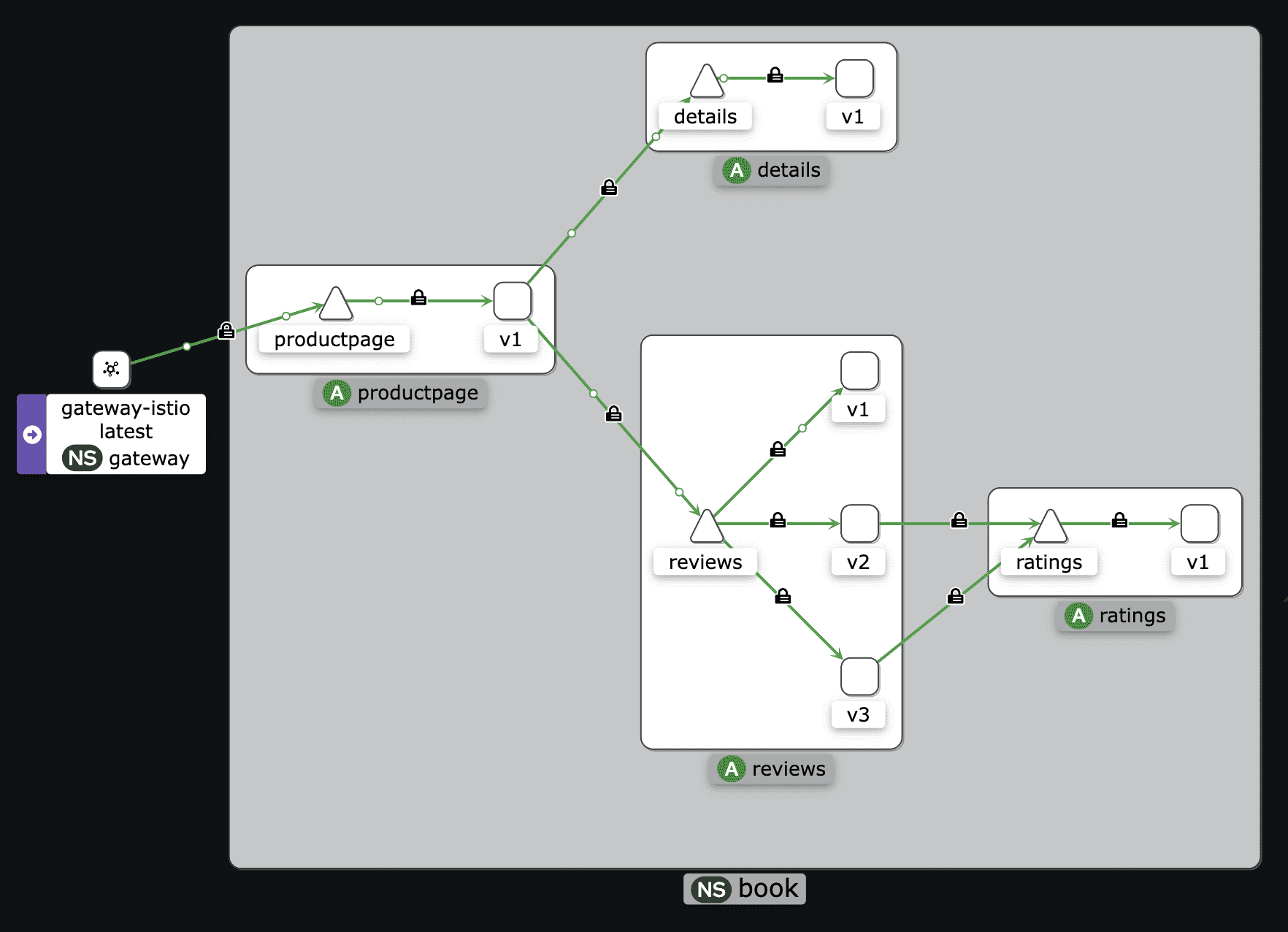
If you have Kiali, you can see the Traffic Graph for the book application:
Conclusion
Kubernetes Gateway is an advanced traffic routing API for Kubernetes that addresses numerous issues that Ingress is unable to resolve. Use it to set up various traffic management capabilities including load balancing, TLS passthrough, request header-based traffic routing, and more consistent, portable integration with external services.
If you found this useful, you can buy me a coffee! Thanks for the support!